# Dual Stack with Leather

{% hint style="warning" %}
This guide is specifically for users that use the Leather wallet. This assumes you have the Leather wallet extension setup. The flow will also be similar for Xverse wallet users.
{% endhint %}

The Dual Stacking Web App is the primary user interface for participating in Dual Stacking — a mechanism that allows Bitcoin holders to earn BTC-denominated rewards through sBTC, and maximize those rewards by either stacking STX or using sBTC in DeFi.

{% hint style="danger" %}
Ensure that you are using the official Dual Stacking app located at [app.stacks.co](https://app.stacks.co/).
{% endhint %}

For this guide, we'll walkthrough how you can use your Leather wallet in enrolling Dual Stacking and participating in DeFi for boosted rewards. This guide assumes you have already setup a Leather wallet extension.

If you need assistance in setting up your Leather wallet extension, check out their webpage [here](https://leather.io/).

Before enrolling in Dual Stacking, you'll need sBTC. Peg in BTC to sBTC through the [sBTC bridge](https://app.stacks.co/) (where it remains 1:1 Bitcoin-backed at all times). Check out the dedicated [guide](https://docs.stacks.co/build/sbtc/how-to-use-the-sbtc-bridge) on how you can mint sBTC to your Leather wallet.

### Walkthrough for enrolling in Dual Stacking

Here are the necessary steps to enroll your sBTC using Leather:

{% stepper %}
{% step %}
**Connect Leather to the Dual Stacking app**

Upon popup of the connect wallet modal, select the Leather option to connect with.

<div data-with-frame="true"><figure><img src="https://2842511454-files.gitbook.io/~/files/v0/b/gitbook-x-prod.appspot.com/o/spaces%2FH74xqoobupBWwBsVMJhK%2Fuploads%2Fgit-blob-e697c990dd7a95a0c09ec68b85259ea4322c9536%2Fimage.png?alt=media" alt=""><figcaption><p>Confirm connecting in your Leather modal popup.</p></figcaption></figure></div>
{% endstep %}

{% step %}
**Enroll now for Dual Stacking**

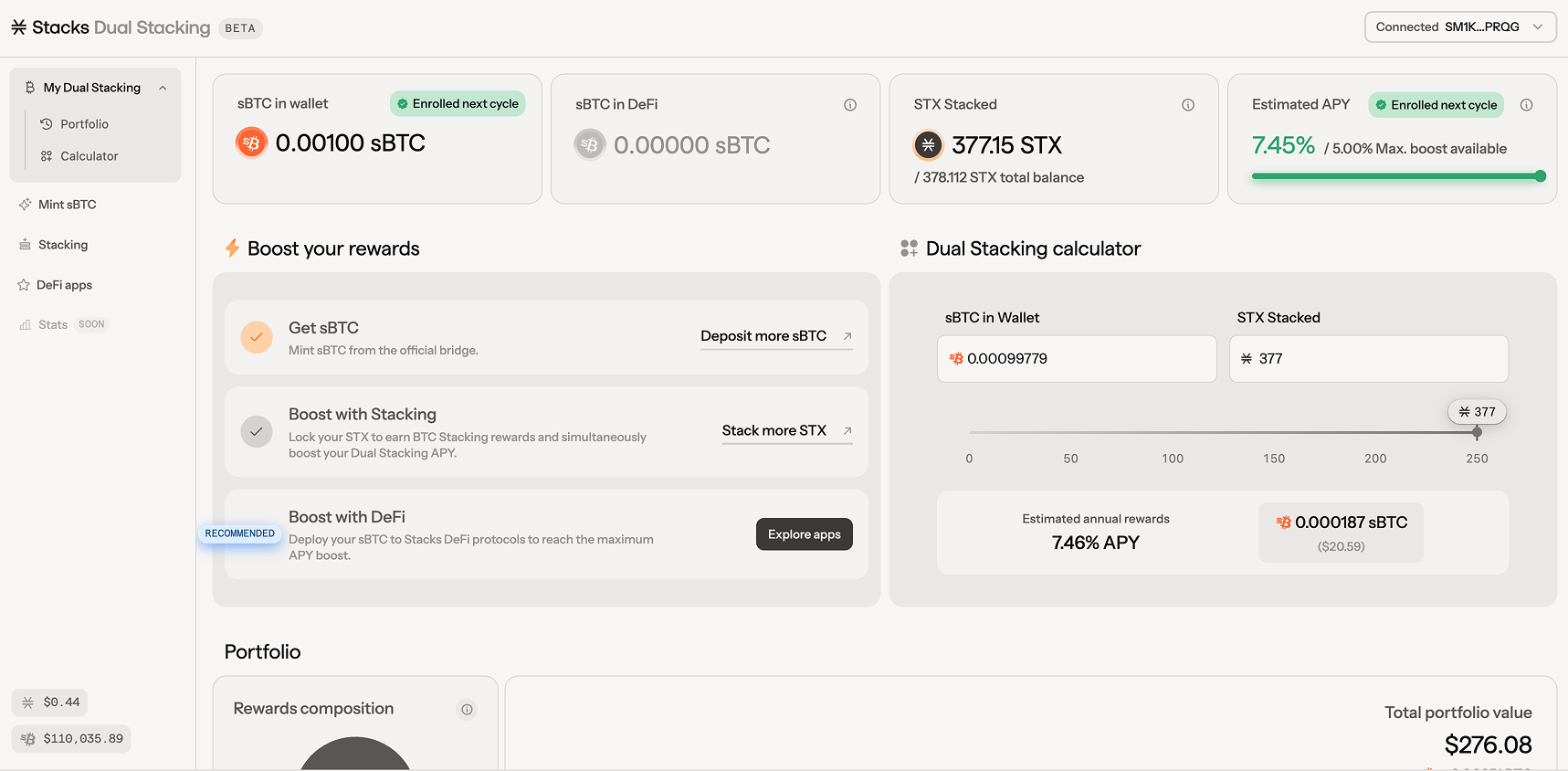
On the dashboard, you'll be able to see stats regarding your current sBTC in wallet, sBTC in DeFi, STX currently stacked, and estimated APY you could be earning.

<div data-with-frame="true"><figure><img src="https://2842511454-files.gitbook.io/~/files/v0/b/gitbook-x-prod.appspot.com/o/spaces%2FH74xqoobupBWwBsVMJhK%2Fuploads%2Fgit-blob-77d893cfa58afad2c762ebb6bf4ed77913d25695%2Fimage.png?alt=media" alt=""><figcaption></figcaption></figure></div>

Let's get started by enrolling your sBTC into Dual Stacking.

<div data-with-frame="true"><figure><img src="https://2842511454-files.gitbook.io/~/files/v0/b/gitbook-x-prod.appspot.com/o/spaces%2FH74xqoobupBWwBsVMJhK%2Fuploads%2Fgit-blob-4286197b5872ade0949a41dc95cbd691b882b678%2Fimage.png?alt=media" alt=""><figcaption></figcaption></figure></div>

Your Leather extension will appear with a popup asking you to review the transaction for approval. This will create the transaction which you will sign and broadcast in your Leather web wallet view.

Your enroll transaction will look like this [here](https://explorer.hiro.so/txid/0x3b4ea853df54825adad3ab475d93be18c6a12f04033c665d4597984786feb608?chain=mainnet).
{% endstep %}

{% step %}
**You are now enrolled in Dual Stacking**

You'll notice your sBTC now enrolled in Dual Stacking and when the rewards cycle will start for your enrolled sBTC.

<div data-with-frame="true"><figure><img src="https://2842511454-files.gitbook.io/~/files/v0/b/gitbook-x-prod.appspot.com/o/spaces%2FH74xqoobupBWwBsVMJhK%2Fuploads%2Fgit-blob-1baf7eb30e86b887beeaa961aa665b412e39d22c%2Fimage%2063.png?alt=media" alt=""><figcaption><p>You are now Dual Stacking!</p></figcaption></figure></div>

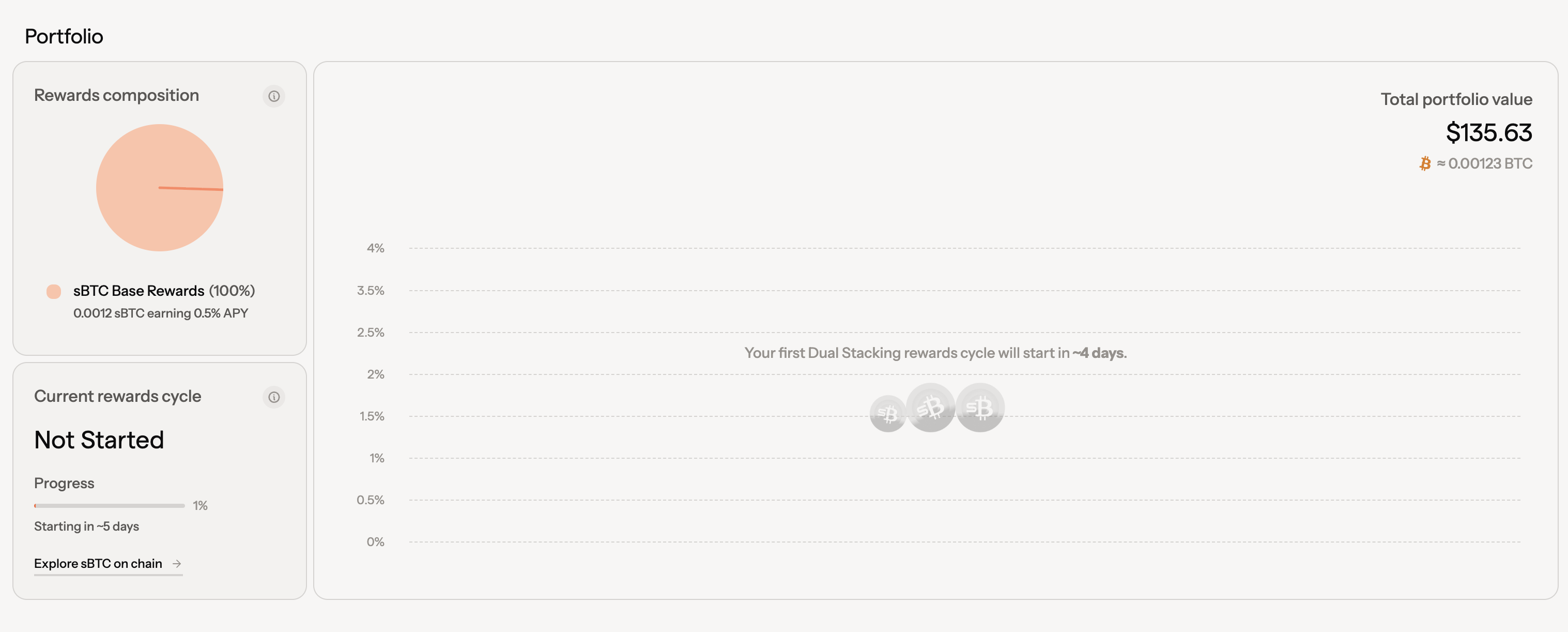
The dashboard will also provide a view of your Dual Stacking portfolio. Track your balances, rewards and payouts at anytime.

<div data-with-frame="true"><figure><img src="https://2842511454-files.gitbook.io/~/files/v0/b/gitbook-x-prod.appspot.com/o/spaces%2FH74xqoobupBWwBsVMJhK%2Fuploads%2Fgit-blob-9577dcdcd093284717cfcc39c056543e461f7b31%2Fimage.png?alt=media" alt=""><figcaption></figcaption></figure></div>

Use the Dual Stacking calculator for estimated rewards based on the ratio of sBTC in your wallet and STX stacked. For more details on your rewards are calculated and the math behind it, check out the section on the [reward function](https://docs.stacks.co/learn/economic-model#reward-function-parameters).

<div data-with-frame="true"><figure><img src="https://2842511454-files.gitbook.io/~/files/v0/b/gitbook-x-prod.appspot.com/o/spaces%2FH74xqoobupBWwBsVMJhK%2Fuploads%2Fgit-blob-983ff96f5294db640d9a76b626e5e002755dd968%2Fimage.png?alt=media" alt=""><figcaption></figcaption></figure></div>
{% endstep %}

{% step %}
**Boost rewards by stacking STX**

So what's next? You could then boost your rewards by stacking STX. Let's start by stacking STX via [StackingDAO](https://www.stackingdao.com/). StackingDAO is a popular stacking option in Stacks as it is a liquid stacking method.

{% hint style="info" %}
There are other options for stacking your STX that you can find [here](https://app.leather.io/stacking).
{% endhint %}

Navigate to the StackingDAO app, connect your wallet, and start stacking. There are many methods to start liquid stacking or native stacking within StackingDAO. In this example, we'll use our STX to liquid stack with sBTC yield.

<div data-with-frame="true"><figure><img src="https://2842511454-files.gitbook.io/~/files/v0/b/gitbook-x-prod.appspot.com/o/spaces%2FH74xqoobupBWwBsVMJhK%2Fuploads%2Fgit-blob-510d2f5c99fa612e6d5759dfbd6ab06def77fc4e%2Fimage%2092.png?alt=media" alt=""><figcaption><p>Liquid stacking with sBTC yield allows us to stay liquid and earn sBTC while stacking.</p></figcaption></figure></div>

Choose the amount in STX that you want to stack and click on 'Confirm Stack', your Leather wallet extension will then appear prompting you to approve transaction.

Navigate back to the Dual Stacking app, and you'll then notice the Dual Stacking app has instantly detect your stacked positions and include that as part of your portfolio's reward composition for boosted rewards.

<div data-with-frame="true"><figure><img src="https://2842511454-files.gitbook.io/~/files/v0/b/gitbook-x-prod.appspot.com/o/spaces%2FH74xqoobupBWwBsVMJhK%2Fuploads%2Fgit-blob-08abb6b42c2fe5a1003a04833127e83ee14a427a%2Fimage%2095.png?alt=media" alt=""><figcaption><p>Notice the change in estimated APY and total portfolio value after stacking.</p></figcaption></figure></div>

Let's then boost reward with Stacks DeFi. This will help reach the maximum APY boost for your sBTC.
{% endstep %}

{% step %}
**Deploy your sBTC to Stacks DeFi protocols**

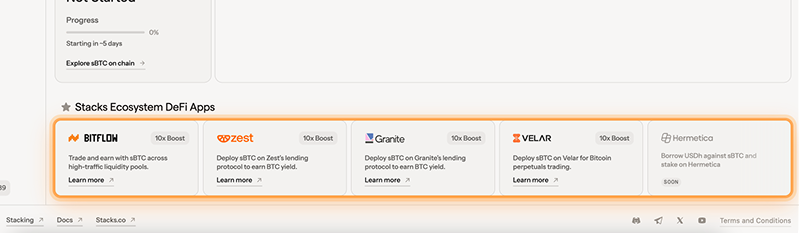
You'll notice near the bottom of the dashboard page, there is a section highlighting popular DeFi protocols in Stacks. Each one of these protocols are eligible for the boosted rewards you can realize.

<div data-with-frame="true"><figure><img src="https://2842511454-files.gitbook.io/~/files/v0/b/gitbook-x-prod.appspot.com/o/spaces%2FH74xqoobupBWwBsVMJhK%2Fuploads%2Fgit-blob-ce091cec2b9f7544f47f640f6b314c8ba35f9c53%2Fimage%2069.png?alt=media" alt=""><figcaption></figcaption></figure></div>

Let's deploy sBTC with Zest. Supplying sBTC in Zest will provide users with a supply APY. Confirm the 'Supply' transaction via the same signature flow using Leather.

<div data-with-frame="true"><figure><img src="https://2842511454-files.gitbook.io/~/files/v0/b/gitbook-x-prod.appspot.com/o/spaces%2FH74xqoobupBWwBsVMJhK%2Fuploads%2Fgit-blob-a9a9a34bd765b9c5a86d6836ef9e1774a3ff8d5c%2Fimage%2074.png?alt=media" alt=""><figcaption></figcaption></figure></div>

After deploying sBTC into Zest, navigate back to the Dual Stacking web app to see your current estimated APY and rewards composition.

<div data-with-frame="true"><figure><img src="https://2842511454-files.gitbook.io/~/files/v0/b/gitbook-x-prod.appspot.com/o/spaces%2FH74xqoobupBWwBsVMJhK%2Fuploads%2Fgit-blob-8af2350646d52a85d13fd5c9c409546a223064d9%2Fimage.png?alt=media" alt=""><figcaption><p>View a breakdown of rewards per reward cycle.</p></figcaption></figure></div>

Check back on the Dual Stacking dashboard to stay current with your rewards and rewards composition. Depending on when your rewards cycle start for your enrollment, you'll see the rewards breakdown in the middle section. All rewards are distributed in sBTC, redeemable 1:1 for BTC anytime.
{% endstep %}
{% endstepper %}

***

Reach out to us on [Discord](https://discord.com/invite/stacks-621759717756370964) for any further questions regarding Dual Stacking.