> For the complete documentation index, see [llms.txt](https://docs.stacks.co/llms.txt). Markdown versions of documentation pages are available by appending `.md` to page URLs; this page is available as [Markdown](https://docs.stacks.co/learn/sbtc/sbtc-operations/deposit.md).
# Pegging in sBTC
Converting BTC to sBTC.
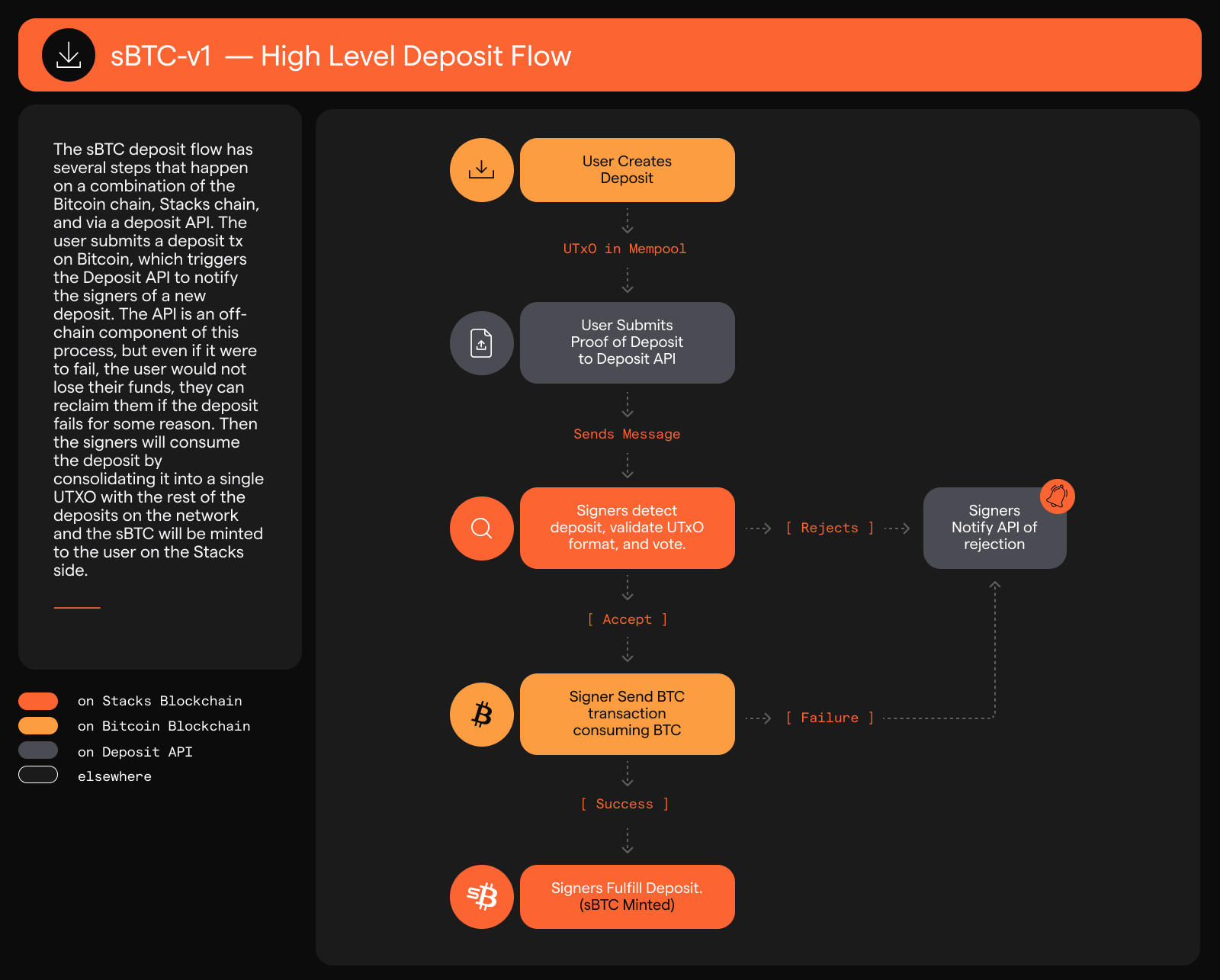
The deposit operation enables users to mint sBTC, anchored to the BTC they have placed in the threshold wallet on the Bitcoin chain. This process can be completed within a single Bitcoin block, streamlining the user experience.
## Process Overview
The deposit process begins when a user initiates a specific Bitcoin transaction that has two outputs. The depositor (usually through the application they are using to deposit) then initiates an API call referencing that Bitcoin transaction. This call triggers the Emily API, which relays deposit information to the sBTC Signers. These signers verify and process the deposit. Once verified, an equivalent amount of sBTC is minted on the Stacks blockchain.
{% stepper %}
{% step %}
**Script output**
A script that lets the signers spend the funds.
{% endstep %}
{% step %}
**Time-locked output**
A time lock that allows the depositor to reclaim the funds if necessary.
{% endstep %}
{% endstepper %}
For more information on deposit and withdrawal confirmation times and why deposits can be so fast, check out the [Deposit and Withdrawal Times](/learn/sbtc/sbtc-operations/deposit-vs-withdrawal-times.md) doc.
## Bitcoin Deposit Requirements
For a deposit to be considered valid, it must adhere to specific requirements:
* The deposit must be made to a taproot address.
* The output must be spendable by a consensus threshold of signers.
* The deposit must follow a format that prevents short-term clawbacks, ensuring the security and integrity of the system.
## User Experience
From a user's perspective, the deposit process is straightforward:
1. Initiate a BTC transaction to the specified address.
2. Wait for the transaction to be confirmed on the Bitcoin blockchain.
3. Receive the equivalent amount of sBTC in the Stacks wallet once the deposit is verified and processed.
To enhance the user experience, an sBTC bridge web application is currently in development which will provide an intuitive interface for users to track the status of their deposit operations, allowing users to stay informed throughout the process from initiation to completion.
---
# Agent Instructions
This documentation is published with GitBook. GitBook is the documentation platform designed so that both humans and AI agents can read, navigate, and reason over technical content effectively. Learn more at gitbook.com.
## Querying This Documentation
If you need additional information that is not directly available in this page, you can query the documentation by asking a question.
Perform an HTTP GET request on the following URL with the `ask` and `goal` query parameters:
```
GET https://docs.stacks.co/learn/sbtc/sbtc-operations/deposit.md?ask=&goal=
```
`ask` is the immediate question: it should be specific, self-contained, and written in natural language.
`goal` is what the user is ultimately trying to achieve, the reason they need the answer. Sharing it helps GitBook give you a better, more relevant answer. A goal is most helpful when it describes the outcome the user wants rather than restating the question. For example, with `ask=how do I create an API token`, a goal like `automate deployments from our CI pipeline` lets GitBook tailor the answer to that use case.
The response will contain a direct answer to the question and relevant excerpts and sources from the documentation.
Use this mechanism when the answer is not explicitly present in the current page, you need clarification or additional context, or you want to retrieve related documentation sections.