> For the complete documentation index, see [llms.txt](https://docs.stacks.co/llms.txt). Markdown versions of documentation pages are available by appending `.md` to page URLs; this page is available as [Markdown](https://docs.stacks.co/learn/zh/network-fundamentals/mainnet-and-testnets.md).

# 主网和测试网

<div data-with-frame="true"><figure><img src="https://629346125-files.gitbook.io/~/files/v0/b/gitbook-x-prod.appspot.com/o/spaces%2FH74xqoobupBWwBsVMJhK%2Fuploads%2Fgit-blob-b9085514942994a4f51310436d9280ca02b58aca%2Fimage.png?alt=media" alt=""><figcaption></figcaption></figure></div>

Stacks 同时拥有主网和测试网，分别用于不同目的。主网和测试网是两个完全不同的公共网络，代币不能在两者之间转移。

### 主网和测试网技术规格

<table><thead><tr><th width="215.19140625"></th><th width="244.26953125">主网</th><th>测试网</th></tr></thead><tbody><tr><td>链 ID</td><td><code>1</code></td><td><code>2147483648</code></td></tr><tr><td>交易版本</td><td><code>0</code></td><td><code>128</code></td></tr><tr><td>魔法字节</td><td><code>X2</code></td><td><code>T2</code></td></tr><tr><td>浏览器</td><td><a href="https://explorer.hiro.so/">https://explorer.hiro.so/</a></td><td><a href="https://explorer.hiro.so/?chain=testnet">https://explorer.hiro.so/?chain=testnet</a></td></tr><tr><td>Stacks API 基础 URL</td><td><a href="https://api.hiro.so">https://api.hiro.so</a></td><td><a href="https://api.testnet.hiro.so">https://api.testnet.hiro.so</a></td></tr><tr><td>地址格式 / 版本</td><td><strong>SP</strong>3B108...2DNJA0 / <code>22</code></td><td><strong>ST</strong>3B108P...EQEZY5 / <code>26</code></td></tr><tr><td>多重签名格式 / 版本</td><td><strong>SM</strong>3RWH...5X9DXM / <code>20</code></td><td><strong>SN</strong>8NKFP...2NAQJA / <code>21</code></td></tr><tr><td>创世区块</td><td><a href="https://explorer.hiro.so/block/0x6b2c809627f2fd19991d8eb6ae034cb4cce1e1fc714aa77351506b5af1f8248e?chain=mainnet">区块 #1</a></td><td><a href="https://explorer.hiro.so/block/0xc9938007fe5f8cc312d782349a6cfbaee7598e08acc4f4da31c876a4b16d4153?chain=testnet">区块 #1</a></td></tr><tr><td>sBTC 合约</td><td><a href="https://explorer.hiro.so/token/SM3VDXK3WZZSA84XXFKAFAF15NNZX32CTSG82JFQ4.sbtc-token?chain=mainnet">SM3VDXK3WZZSA84XXFKAFAF15NNZX32CTSG82JFQ4.sbtc-token</a></td><td><a href="https://explorer.hiro.so/token/SN3VMHXEN64ZZF71JQ5VESXDWTR301XTTXGF4J8F1.sbtc-token?chain=testnet">SN3VMHXEN64ZZF71JQ5VESXDWTR301XTTXGF4J8F1.sbtc-token</a></td></tr></tbody></table>

### 主网

Stacks 主网直接锚定比特币主网，代币在该网络上具有实际货币价值。这是生产网络，应按生产环境对待。

### 测试网

Stacks 测试网为开发者提供了一个实时的公共沙盒，使他们能够在一个模拟主网的环境中构建、测试并迭代应用和智能合约。它提供了一个无风险的空间，可在部署到 Stacks 主网之前尝试更改或新功能，确保一切正常运行而无需承担真实的财务损失风险。

#### 测试网水龙头

测试网水龙头会向你提供用于测试的模拟 Stacks（STX）代币。这些测试网 STX 没有价值，也不同于主网上的 STX。获取测试网 STX 有几种不同的选择。

{% tabs %}
{% tab title="平台" %}
你可以从以下途径获取测试网 STX [平台](https://platform.hiro.so/faucet)，这是推荐的方式。

要从平台内获取 STX 代币，请前往顶部的“Faucet”标签页。然后你可以选择测试网 STX 或 sBTC，再粘贴你想接收的测试网 STX 地址。

<div data-with-frame="true"><figure><img src="https://629346125-files.gitbook.io/~/files/v0/b/gitbook-x-prod.appspot.com/o/spaces%2FH74xqoobupBWwBsVMJhK%2Fuploads%2FjjVK8GVvGbnDTQxzgJ5t%2Fimage.png?alt=media&amp;token=e82a313d-4381-45cc-9a36-ba02a598d9f4" alt=""><figcaption></figcaption></figure></div>
{% endtab %}

{% tab title="沙盒" %}
使用由以下提供的水龙头 [Explorer 沙盒](https://explorer.hiro.so/sandbox/deploy?chain=testnet) 也是另一种选择。

你首先需要将钱包连接到 Explorer 沙盒，然后点击“Request STX”。在请求之前，请确保你的钱包已切换到测试网网络。

<div data-with-frame="true"><figure><img src="https://629346125-files.gitbook.io/~/files/v0/b/gitbook-x-prod.appspot.com/o/spaces%2FH74xqoobupBWwBsVMJhK%2Fuploads%2FQCTtyAN2r4btyxWOyJs3%2Fsandbox-faucet.png?alt=media&amp;token=ac55a1c3-fbe8-4424-a513-3074c7befc5d" alt=""><figcaption></figcaption></figure></div>
{% endtab %}

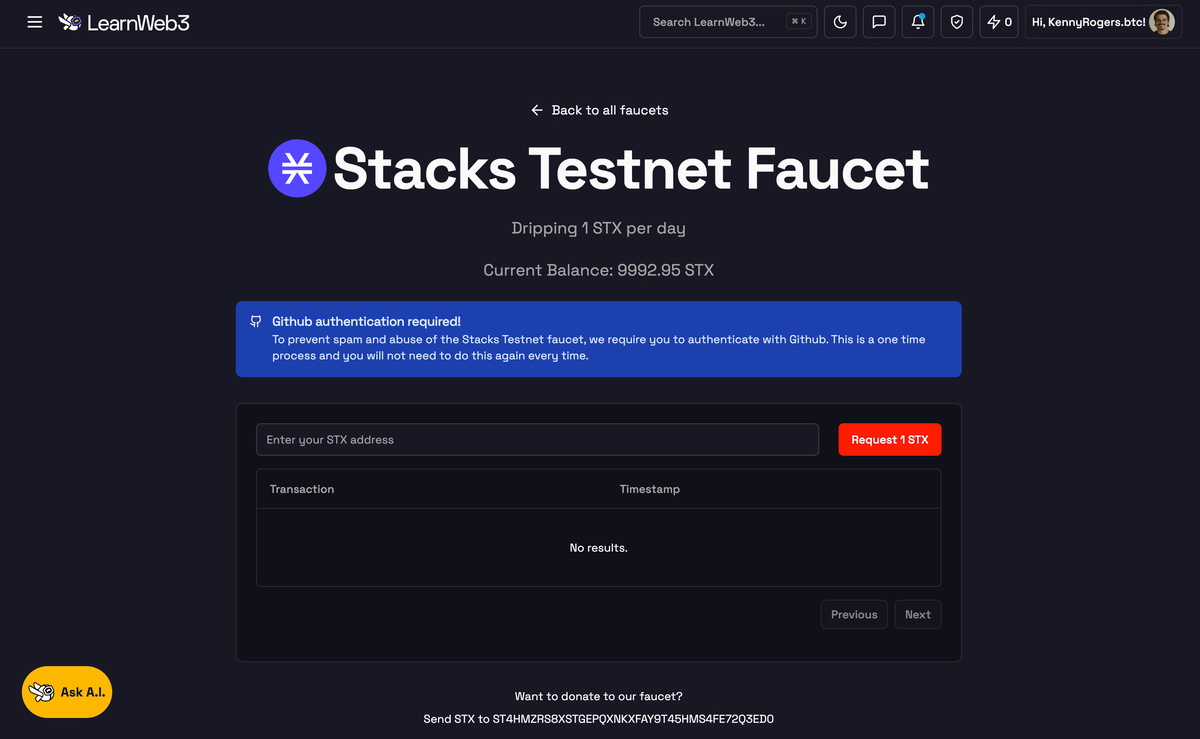
{% tab title="LearnWeb3" %}
或者，你可以使用 [LearnWeb3 水龙头](https://learnweb3.io/faucets).

<div data-with-frame="true"><figure><img src="https://629346125-files.gitbook.io/~/files/v0/b/gitbook-x-prod.appspot.com/o/spaces%2FH74xqoobupBWwBsVMJhK%2Fuploads%2Fgit-blob-6b3929bea804b05efe83f4bb140709378b6024fb%2Fimage.png?alt=media" alt=""><figcaption></figcaption></figure></div>
{% endtab %}
{% endtabs %}


---

# Agent Instructions
This documentation is published with GitBook. GitBook is the documentation platform designed so that both humans and AI agents can read, navigate, and reason over technical content effectively. Learn more at gitbook.com.

## Querying This Documentation
If you need additional information that is not directly available in this page, you can query the documentation by asking a question.

Perform an HTTP GET request on the following URL with the `ask` and `goal` query parameters:

```
GET https://docs.stacks.co/learn/zh/network-fundamentals/mainnet-and-testnets.md?ask=<question>&goal=<user_goal>
```

`ask` is the immediate question: it should be specific, self-contained, and written in natural language.
`goal` is what the user is ultimately trying to achieve, the reason they need the answer. Sharing it helps GitBook give you a better, more relevant answer. A goal is most helpful when it describes the outcome the user wants rather than restating the question. For example, with `ask=how do I create an API token`, a goal like `automate deployments from our CI pipeline` lets GitBook tailor the answer to that use case.

The response will contain a direct answer to the question and relevant excerpts and sources from the documentation.

Use this mechanism when the answer is not explicitly present in the current page, you need clarification or additional context, or you want to retrieve related documentation sections.