> For the complete documentation index, see [llms.txt](https://docs.stacks.co/llms.txt). Markdown versions of documentation pages are available by appending `.md` to page URLs; this page is available as [Markdown](https://docs.stacks.co/learn/zh/sbtc/using-the-sbtc-bridge-app/how-to-use-the-sbtc-bridge-with-fordefi.md).

# 如何使用 Fordefi 连接 sBTC Bridge

{% hint style="warning" %}
本指南专门适用于使用 [Fordefi](https://fordefi.com/) 的实体或团队，因为它将演示多重审批交易策略设置的流程。本指南假定您已完成 Fordefi 钱包设置，包括浏览器扩展和移动应用。
{% endhint %}

sBTC Bridge 是一个网页应用，允许您将 BTC 在 Stacks 链上转换为 sBTC。如果您不熟悉 sBTC，请务必查看 [sBTC 概念指南](/learn/zh/sbtc.md) 以了解其工作原理。

{% hint style="danger" %}
请确保您使用的是位于 [sbtc.stacks.co](https://sbtc.stacks.co/)的桥。这是唯一官方的 sBTC 桥。
{% endhint %}

sBTC Bridge 的设计尽可能简单易用。但就本指南而言，Fordefi UI 中已经设置了一个 **2-of-2 批准交易策略**，用于比特币交易。本指南假定您有类似设置，因为本指南将带您逐步了解在这种需要多方批准交易的场景下所需的不同步骤。

如果您需要在 Fordefi 中设置此类交易策略的帮助，请查看他们专门的 [文档](https://docs.fordefi.com/user-guide/policies).

### 铸造 sBTC 操作指南

以下是在 Fordefi 中将 BTC 转换为 sBTC 所需的步骤：

{% stepper %}
{% step %}
**确认您的 BTC 和 STX 金库**

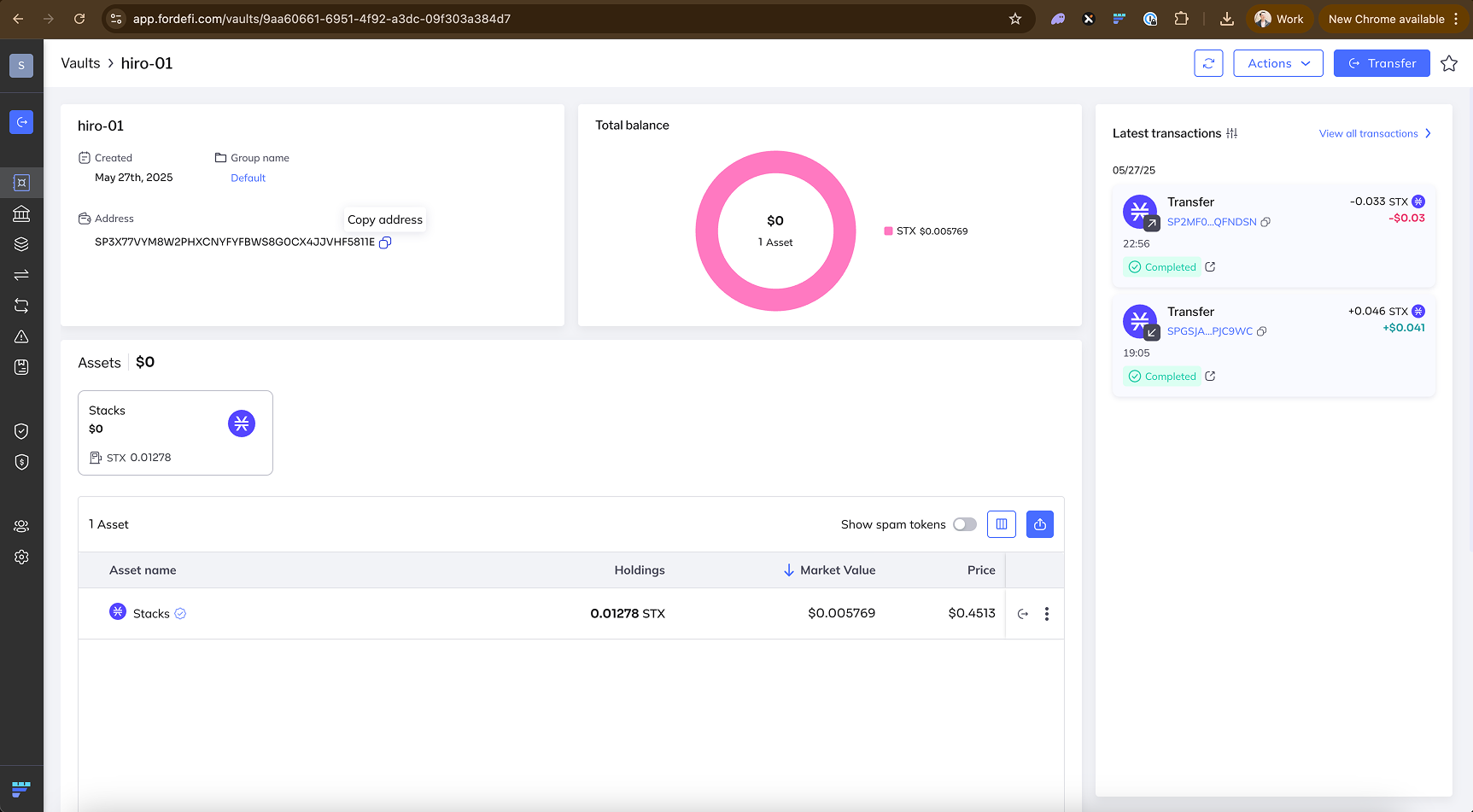
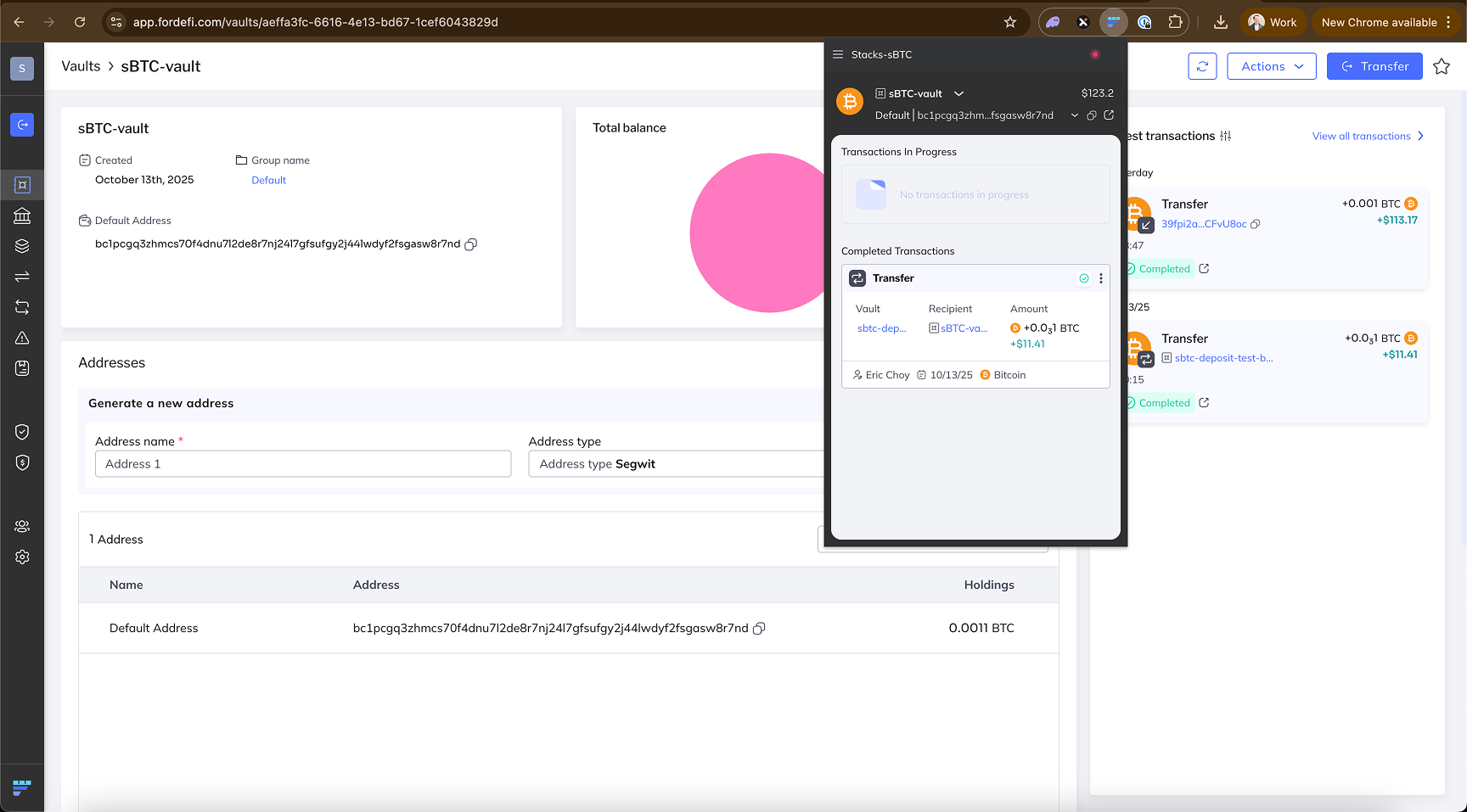
首先，您需要确保您有一个用于比特币的金库，以及一个单独的用于 Stacks 的金库。这两个金库之后都会在连接 sBTC Bridge 应用时使用。

<div data-with-frame="true"><figure><img src="/files/ef57be6ee5133dee3dff753a67a53b7c6d0cb734" alt=""><figcaption><p>用于原生比特币资产的金库</p></figcaption></figure></div>

<div data-with-frame="true"><figure><img src="/files/c370eb287d3d7e983733b9bd44ad009ff3df9ed1" alt=""><figcaption><p>用于原生 Stacks 资产的金库</p></figcaption></figure></div>
{% endstep %}

{% step %}
**连接您的 Fordefi 钱包扩展**

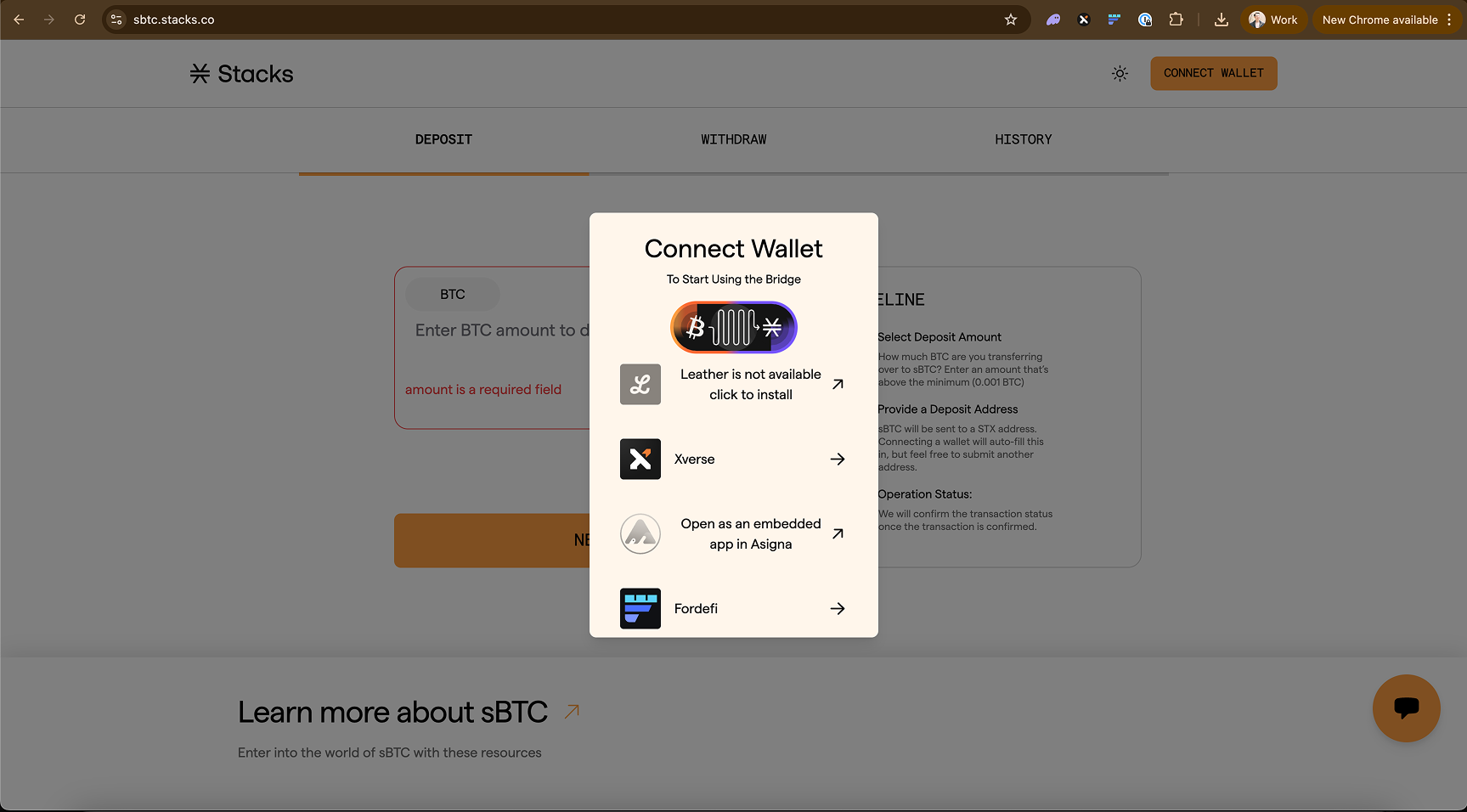
首先，您需要将您的 Fordefi 钱包连接到 sBTC Bridge 应用。

<div data-with-frame="true"><figure><img src="/files/146c869b9af15d8ad0dab3c82894c33319334527" alt=""><figcaption><p>在钱包选择器弹窗中选择 Fordefi 选项</p></figcaption></figure></div>
{% endstep %}

{% step %}
**选择您要使用的比特币和 Stacks 金库**

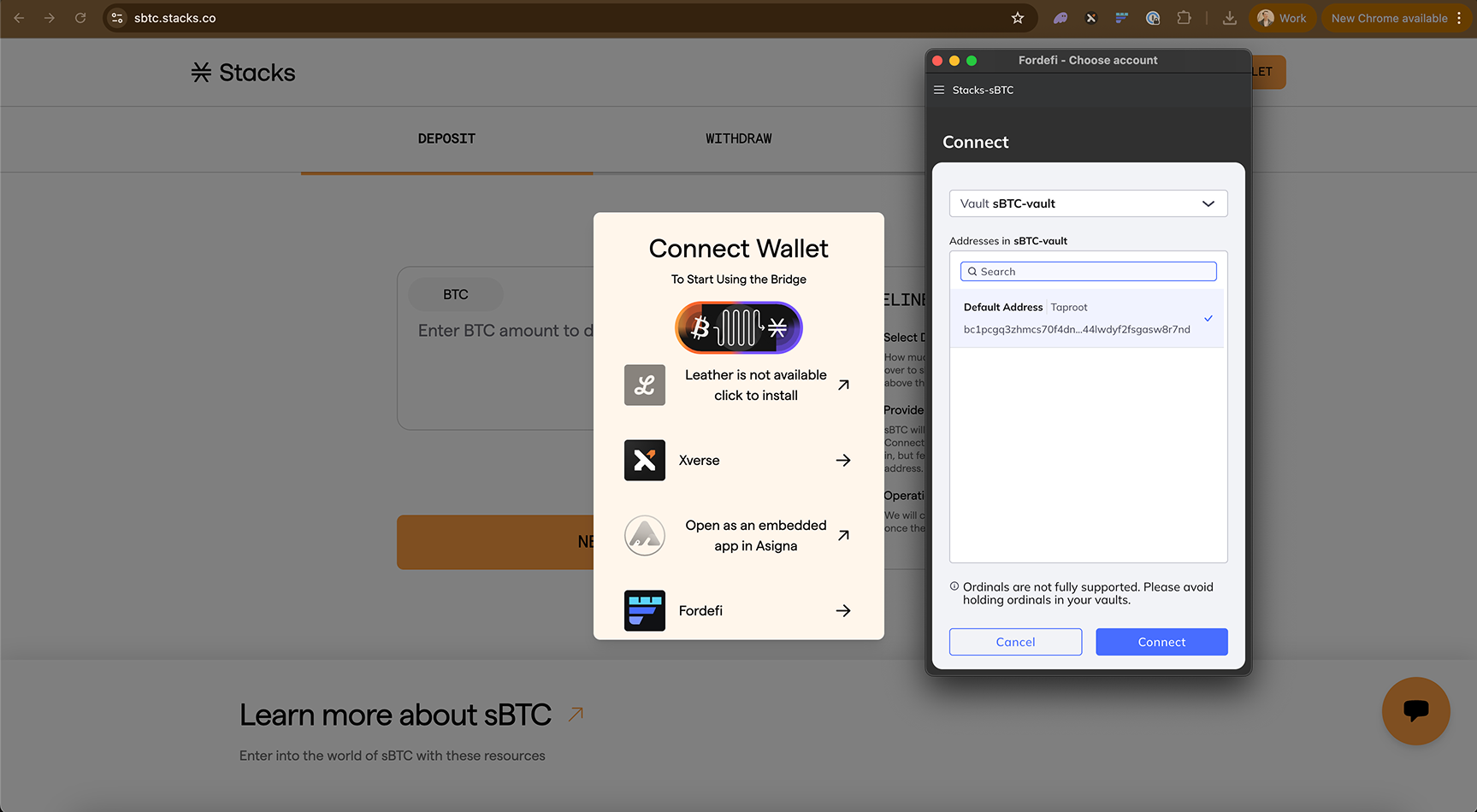
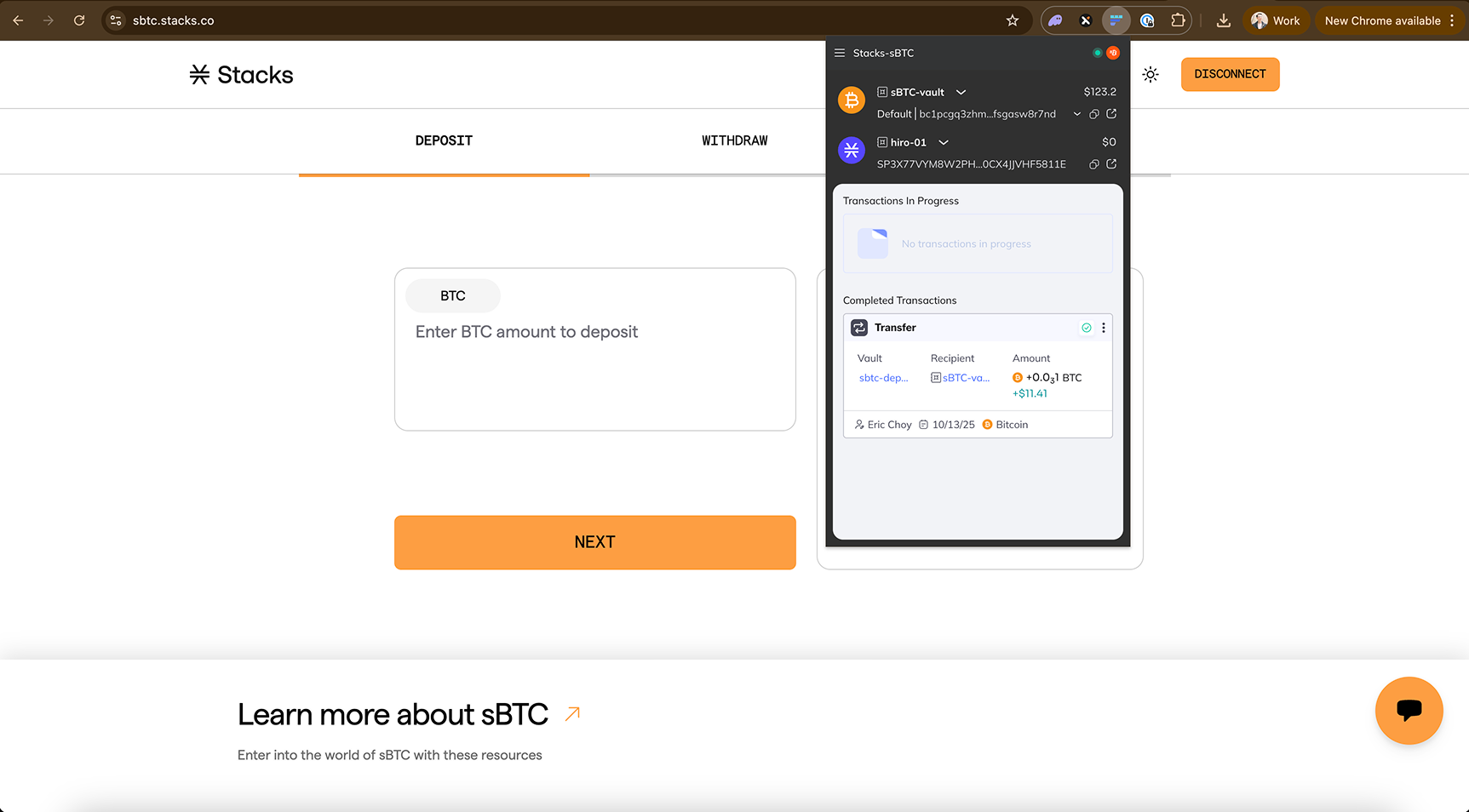
接下来，Fordefi 扩展会要求您先选择要使用的比特币金库，然后再选择要使用的 Stacks 金库。这样做的原因是，您需要先从比特币金库发送一笔比特币交易，然后才能将 sBTC 接收到账到您的 Stacks 金库。

<div data-with-frame="true"><figure><img src="/files/5417d3f9a90ec6ba3a93a20194362af87ec93581" alt=""><figcaption><p>所选比特币金库需要至少持有用于 peg-in 的最低所需金额（0.001 BTC）的比特币</p></figcaption></figure></div>

<div data-with-frame="true"><figure><img src="/files/95ba7b02d660a023df90528e782d640297285144" alt=""><figcaption><p>当两个金库都选定后，连接时您会在 Fordefi 扩展顶部看到它们</p></figcaption></figure></div>
{% endstep %}

{% step %}
**选择要存入的 BTC 数量**

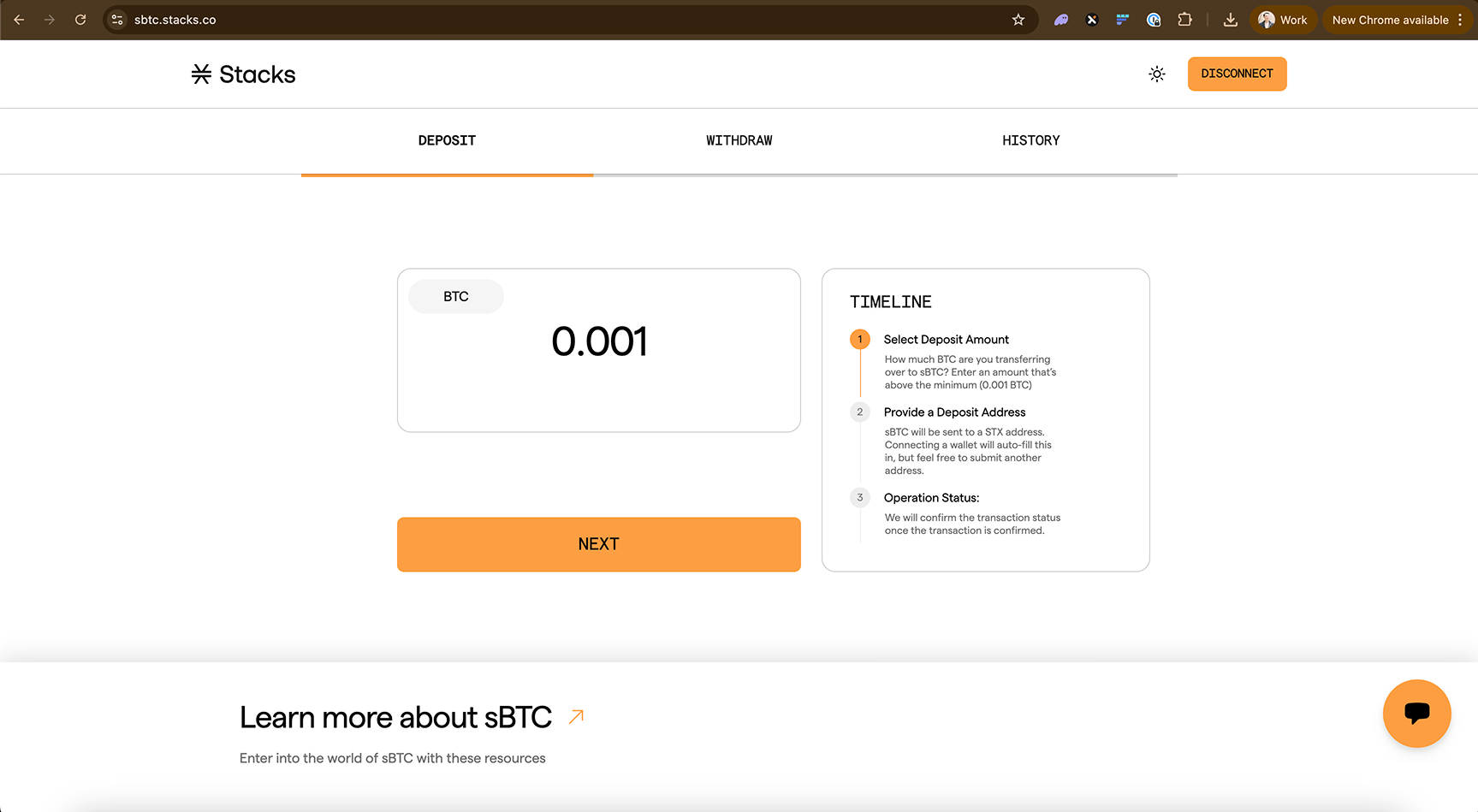
钱包连接后，选择您希望转换为 sBTC 的 BTC 数量。

{% hint style="info" %}
铸造 sBTC 需要两笔交易费用。第一笔是在您的钱包中发起比特币存款交易时产生的。第二笔是用于将存款 UTXO 合并为单个签名者 UTXO 的费用。这笔单独的交易费用会自动发生，最高设为 80k sats。它会自动从您铸造出的 sBTC 中扣除。这不是签名者费用，而是普通的比特币交易费用。
{% endhint %}

<div data-with-frame="true"><figure><img src="/files/d549ba871206f547e29c2485a1cb6dadb7f44e4a" alt=""><figcaption></figcaption></figure></div>
{% endstep %}

{% step %}
**选择铸造 sBTC 的 Stacks 地址**

接下来，输入您希望铸造 sBTC 到达的 Stacks 地址。这将只是您在连接 Fordefi 钱包扩展时，之前所选的 Stacks 金库对应的 Stacks 地址。

<div data-with-frame="true"><figure><img src="/files/902bf91176932e8c526b7accd2ea8b7bdd08f8e5" alt=""><figcaption><p>检查已输入的 STX 地址，然后确认</p></figcaption></figure></div>
{% endstep %}

{% step %}
**创建初始 BTC 转账**

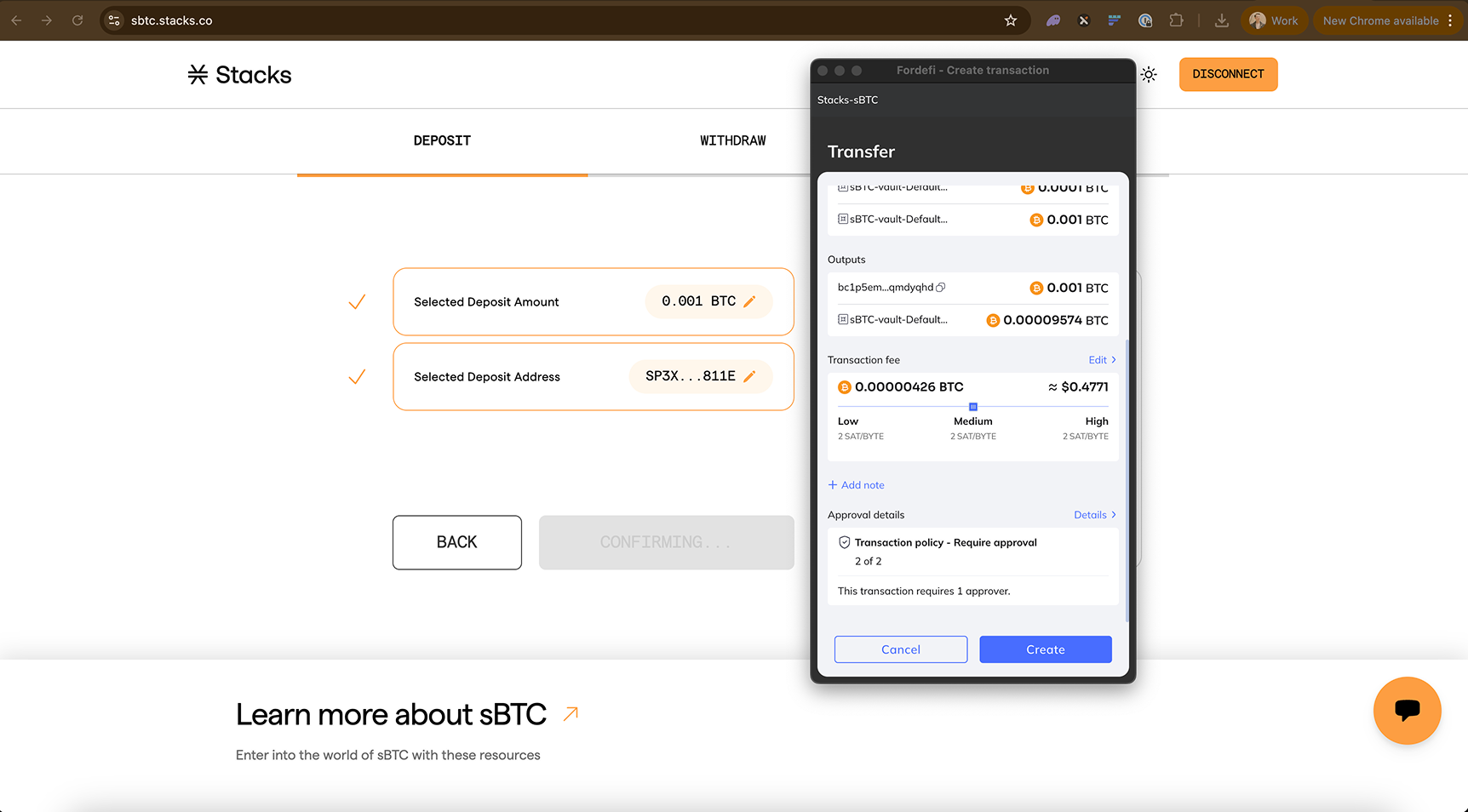
您的 Fordefi 钱包扩展会弹出提示，要求您创建 BTC 交易。这笔交易是将您的 BTC 初始 peg-in 转给 sBTC 签名者。确认交易详情和所需批准详情后，点击“创建”。

{% hint style="info" %}
如果您设置了需要特定批准的交易策略，点击“创建”不会立即发起比特币交易，它只会将这笔未签名交易存储在您的 Fordefi 钱包中，直到满足所有必要批准后才最终签名。
{% endhint %}

<div data-with-frame="true"><figure><img src="/files/b6ac1e1b8d1b923d5e01ab5f0794cfe7a1e8a569" alt=""><figcaption><p>您会注意到，在 Fordefi 扩展的“创建交易”视图底部附近会显示所需的批准详情。请务必确保其他审批人能够及时批准该交易。</p></figcaption></figure></div>

<div data-with-frame="true"><figure><img src="/files/bd973416f69e73db8c4442dad97415b39c117946" alt=""><figcaption><p>如果您随后回到 Fordefi 网页 UI 或扩展 UI，您会看到这笔交易被标记为“等待批准”。</p></figcaption></figure></div>
{% endstep %}

{% step %}
**由审批人批准交易**

在审批人收到交易通知后，每位审批人都需要在其 Fordefi 移动钱包中批准交易，之后才会完成最后一步，即由发起人签署交易。

每位审批人都需要在其 Fordefi 移动钱包中打开待处理交易并点击“批准”。

<div data-with-frame="true"><figure><img src="/files/8b918053c1c387fc6b6926f720ca5d87e4e8671d" alt=""><figcaption><p>审批人批准交易视角</p></figcaption></figure></div>
{% endstep %}

{% step %}
**签署已批准的交易**

一旦所有交易策略都满足并获得批准，发起人就需要在其 Fordefi 移动钱包中正式签署该交易。

此时，这个移动端签名操作会通知 sBTC Bridge 应用。

<div data-with-frame="true"><figure><img src="/files/9b2638b964c60c106895d01e6873152952ae8680" alt=""><figcaption><p>在确认批准和交易详情后，发起人需要点击“签名”</p></figcaption></figure></div>
{% endstep %}

{% step %}
**接收您的 sBTC**

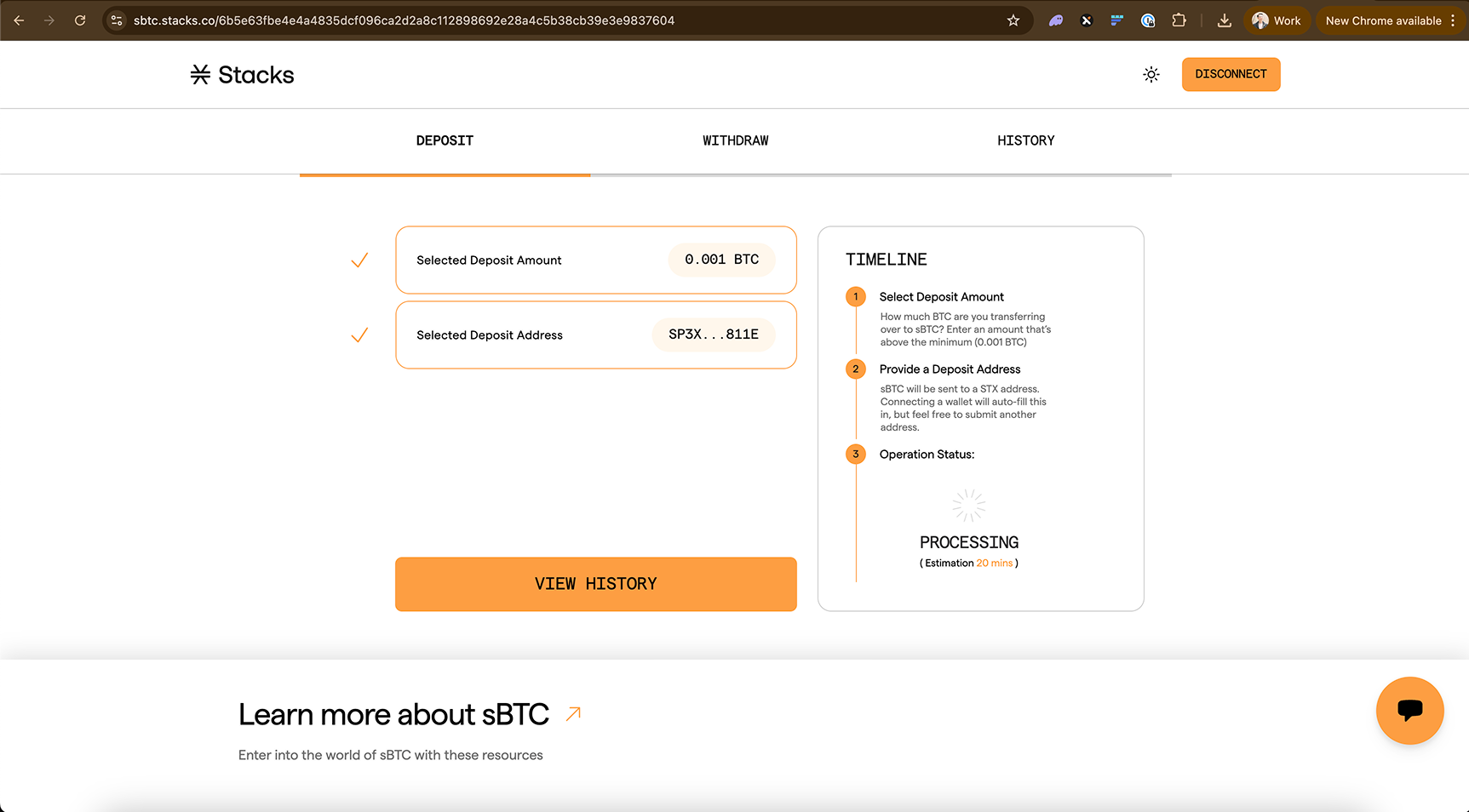
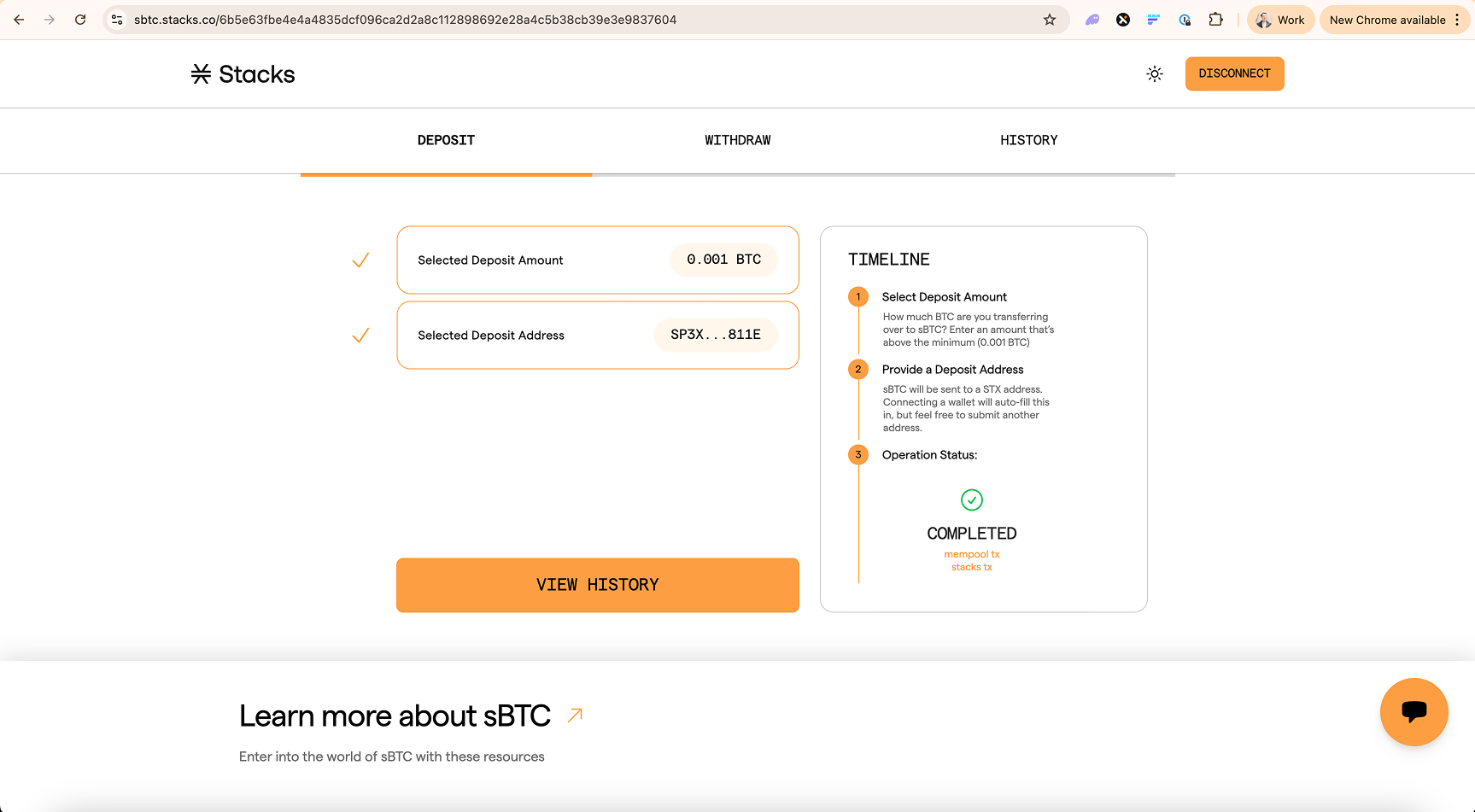
回到 sBTC Bridge 应用界面后，您可以监控交易状态，查看何时完成，此时您就可以在 Fordefi 钱包中看到 sBTC。它会经历三个阶段：

* 待处理 - 您的 [比特币交易](https://mempool.space/tx/6b5e63fbe4e4a4835dcf096ca2d2a8c112898692e28a4c5b38cb39e3e9837604) 正在处理中
* 铸造中 - 您的比特币交易已处理完成，并且 [sBTC 签名者正在铸造](https://explorer.hiro.so/txid/a9e232289d2c6e50150b034894182d341343e7064b27c8dccbd25ebca79b2947?chain=mainnet) 您的 sBTC
* 已完成 - 您的 sBTC 已铸造到您的钱包中

<div data-with-frame="true"><figure><img src="/files/e0570d2c697a5cadd1dbd5dde5e612d22bff14c9" alt=""><figcaption><p>比特币和 sBTC 交易需要一些时间才能被签名者完全处理</p></figcaption></figure></div>

<div data-with-frame="true"><figure><img src="/files/8d08dbeb248e3091bb65bc3f3674c60cad8e09e1" alt=""><figcaption><p>一旦比特币和 sBTC 铸造交易都得到确认，sBTC Bridge 应用将显示“已完成”状态</p></figcaption></figure></div>

<div data-with-frame="true"><figure><img src="/files/353201ff0a963a55a3b9bef44711c01866abb12d" alt=""><figcaption><p>您将能够在 Fordefi 钱包中看到这些交易的结果</p></figcaption></figure></div>
{% endstep %}
{% endstepper %}

### 找回 BTC

如果您的 sBTC 铸造失败，您可以找回您的 sBTC。您可以通过桥在回收页面 <https://sbtc.stacks.co/\\>\<TX\_ID>/reclaim 进行操作，并将方括号中的文本替换为您的交易 ID，如下所示：\
<https://sbtc.stacks.co/8f37f750b6646f0a217121201967170bd3cfef5f2ebd4f30f359b5e9308470c4/reclaim>

在存入 BTC 与 sBTC 签名者将其合并为单个签名者 UTXO 之间有一个中间步骤。如果该交易未被签名者接收，您可以使用此界面进行找回。请注意，回收页面上有一个“锁定时间”字段。这表示在找回您的 BTC 之前必须经过的区块数量。

<div data-with-frame="true"><figure><img src="/files/fd7b1e75f53b9059b7a9dea92e9938abbcf3c2c3" alt=""><figcaption></figcaption></figure></div>

这会发起一笔比特币交易，将您的 BTC 转回给您。


---

# Agent Instructions
This documentation is published with GitBook. GitBook is the documentation platform designed so that both humans and AI agents can read, navigate, and reason over technical content effectively. Learn more at gitbook.com.

## Querying This Documentation
If you need additional information that is not directly available in this page, you can query the documentation dynamically by asking a question.

Perform an HTTP GET request on the current page URL with the `ask` query parameter, and the optional `goal` query parameter:

```
GET https://docs.stacks.co/learn/zh/sbtc/using-the-sbtc-bridge-app/how-to-use-the-sbtc-bridge-with-fordefi.md?ask=<question>&goal=<endgoal>
```

`ask` is the immediate question: it should be specific, self-contained, and written in natural language.
`goal` is optional and describes the broader end goal you are ultimately trying to accomplish on behalf of the user. GitBook uses it to tailor the answer towards what is most useful for that goal.

The response will contain a direct answer to the question and relevant excerpts and sources from the documentation.

Use this mechanism when the answer is not explicitly present in the current page, you need clarification or additional context, or you want to retrieve related documentation sections.